

Python Flask Web Application – Real-Time System Monitoring with CPU, Memory, I/O, and Process Information
by Dung AIin Python , Scripts & Code on August 20, 2024Choose Your Desired Option(s)
Python Flask Web Application – Real-Time System Monitoring with CPU, Memory, I/O, and Process Information
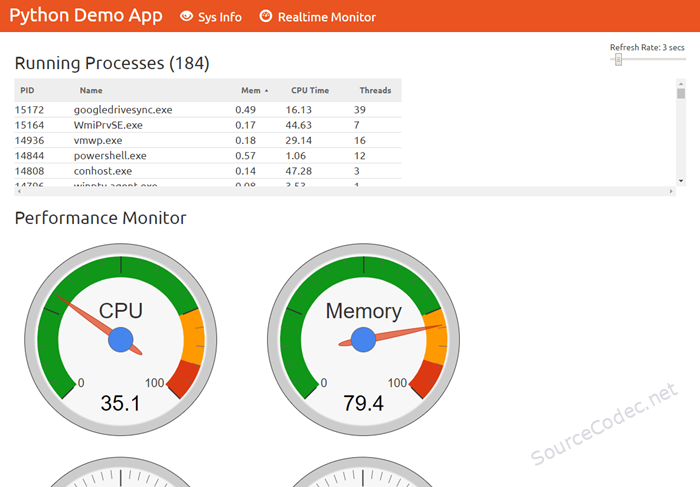
This is a straightforward Python Flask web application that offers system information and a real-time monitoring screen with dials displaying CPU, memory, I/O, and process information.
Designed with cloud-native demos and containers in mind, this app provides a practical example for deployment beyond a basic “hello-world” application while keeping prerequisites to a minimum. It is not meant to be a comprehensive example of a fully functioning architecture or complex software design.
Typical use cases include deployment to Kubernetes, Docker demos, CI/CD (with build pipelines included), cloud deployment (e.g., Azure), monitoring, and auto-scaling

- Be using Linux, WSL or MacOS, with bash, make etc
- Python 3.8+ – for running locally, linting, running tests etc
- Docker – for running as a container, or image build and push
- Azure CLI – for deployment to Azure
A standard GNU Make file is provided to help with running and building locally.
lint 🔎 Lint & format, will not fix but sets exit code on error
lint-fix 📜 Lint & format, will try to fix errors and modify code
image 🔨 Build container image from Dockerfile
push 📤 Push container image to registry
run 🏃 Run the server locally using Python & Flask
deploy 🚀 Deploy to Azure Web App
undeploy 💀 Remove from Azure
test 🎯 Unit tests for Flask app
test-report 🎯 Unit tests for Flask app (with report output)
test-api 🚦 Run integration API tests, server must be running
clean 🧹 Clean up project

The app runs under Flask and listens on port 5000 by default, this can be changed with the PORT environmental variable.
| Download Category | Python, Scripts & Code |
| Product Homepage URL→ | |
| Product Version | |
| File Type | Py |
| File Size | 47 KB |
| Developer | |
| Documentation |
Uploaded by

Related Products


Popular & Trending



Featured Products
No posts were found.